


WatchGuard XTM and UTM Appliance VoIP Support
WatchGuard Firebox® X e-Series and XTM devices support numerous VoIP options, such as Vonage or Cisco SIP and NetMeeting. The addition of the SIP and H.323 proxies in WSM v10.x and Firebox® X Edge v10.x allows VoIP traffic to pass through your network in certain configurations, examples of which are shown below. In the future, support for VoIP devices and configurations will increase.
Below are some sample network diagrams showing how WatchGuard supports VoIP. Though the diagrams show a Firebox® X Core™ e-Series appliance, support for the VoIP configurations is not limited to this device – VoIP is supported across our UTM and XTM product lines.
- Diagrams use the term "call server" to represent the device that handles lookups. If you use SIP-based VoIP technology, such as Vonage or Cisco SIP, the call server is often known as the "registrar. " If you use H.323-based VoIP technology, such as NetMeeting, the call server is usually known as the "gatekeeper. "
- You must add either an H.323 or SIP proxy policy to your configuration for VoIP to operate correctly. See the documentation for your VoIP device or service if you are not sure which proxy policy to add.
These diagrams apply to SIP-based VoIP technology only. While the H.323 proxy enables peer-to-peer VoIP connections through a WatchGuard device, it does not enable connections to a gatekeeper through a WatchGuard device.
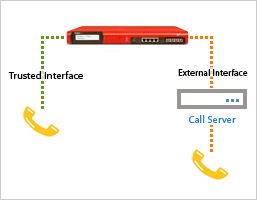 Supported configuration examples for SIP-based VoIP devices:
External registrar - WatchGuard device located between two VoIP endpoints
In this first example, the registrar is external to the WatchGuard device and the WatchGuard device is located between the two VoIP endpoints. Both the trusted VoIP user and the external VoIP user register with the external call server. Calls can be initiated from either VoIP user.
The proxy policy on the WatchGuard device applies NAT to all packets from the trusted VoIP endpoint so that its real IP address is not seen by the registrar. The registrar knows only the external IP address of the WatchGuard device.
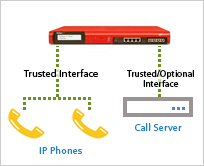 Call server in trusted network with WatchGuard device - VoIP users located on different network with same WatchGuard device protection
In this example, the call server is located on a trusted network protected by a WatchGuard device, and the VoIP users are located on a different network protected by the same WatchGuard device. Your WatchGuard device routes packets between the call server and the VoIP users.
Each user contacts the registrar for lookups as required. The SIP proxy relays the call through the Firebox, but does not rewrite the packets as they go through. No NAT is applied.