


VPN Tracker 9 Products
The #1 VPN Client for Mac OS X
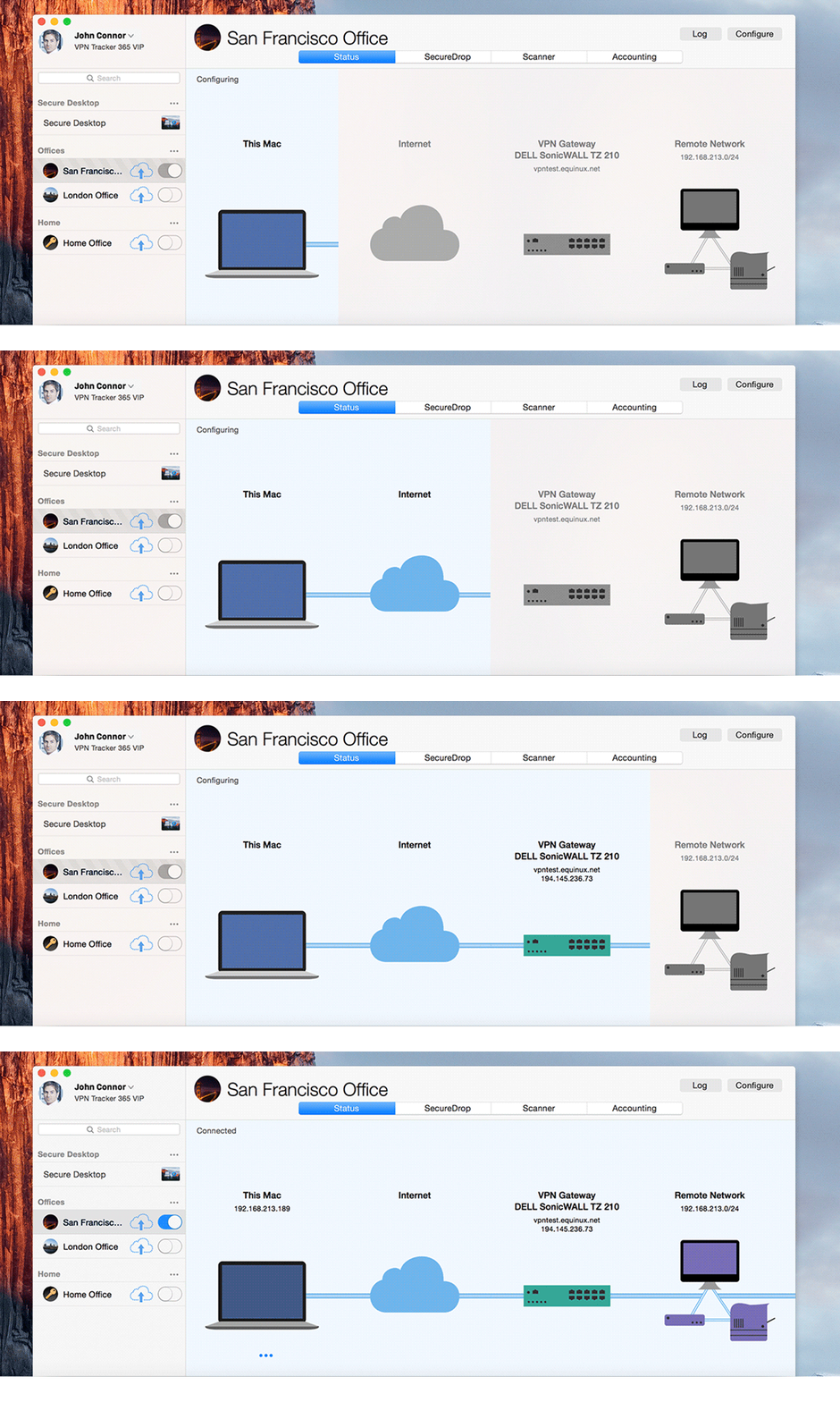
Sorry, this product is no longer available, please contact us for a replacement.
More pricing below, click here!
Overview:
VPN Tracker - Protect your data with the leading Mac VPN client

NEW: SonicWALL SSL VPN support
VPN Tracker 365, the leading Mac VPN client, now supports SonicWALL SSL VPN connections for Mac users. With full support for MobileConnect and NetExtender-compatible SSL VPN connections, VPN Tracker is the perfect solution for Mac users connecting to SonicWALL environments. VPN Tracker 365 also supports IPSec, PPTP, L2TP and OpenVPN connections alongside your SonicWALL SSL VPN, making it the only choice with support for all major VPN protocols. Take advantage of other exclusive features, including Team Management, Connection Safe, Remote Connection Wipe and VPN Shortcuts.
VPN Tracker - Secure data connections for all of your Macs
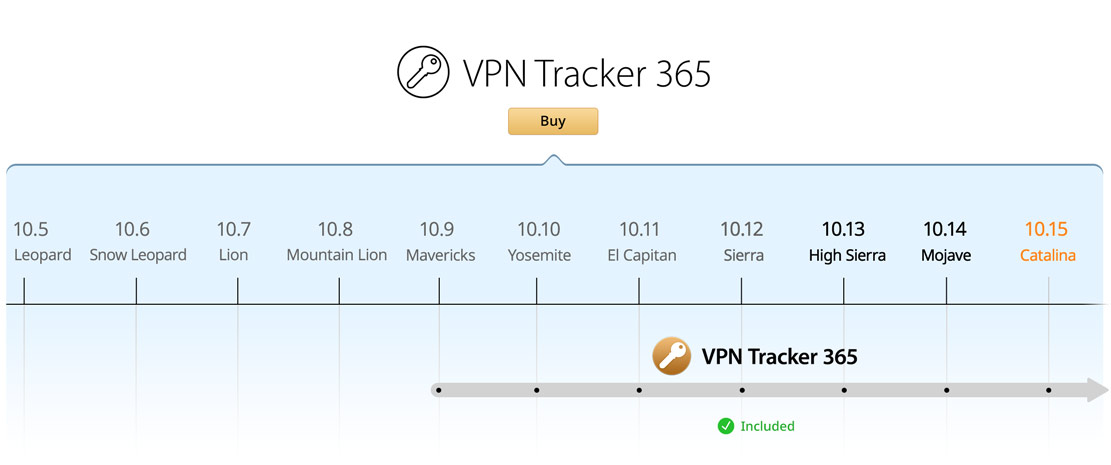
VPN Tracker 365 includes all future updates and supports macOS Catalina, macOS Mojave and beyond.
Company Connect: Connect to your Office IT in minutes on Mac OS X
Setting up a Mac VPN connection doesn't need to be rocket science: The VPN Tracker Company Connect VPN Software for Mac includes step-by-step configuration guides and ready-made configuration profiles for all VPN gateway vendors. Experience the leading Mac VPN client!
Supported VPN protocols & standards The leading OS X VPN client supports:
- IPSec VPN client
- L2TP VPN client
- PPTP VPN client
- OpenVPN
- SonicWALL SSL VPN client
- SonicWALL Simple Client Provisioning
- Cisco Easy VPN
- Cisco Meraki VPN
- Mode Config (Netgear, Juniper, Lancom)
- WatchGuard Mobile User VPN
- CheckPoint Hybrid Mode
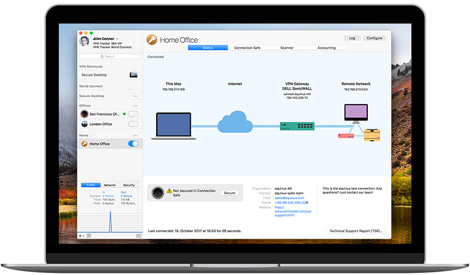

Why should I choose VPN Tracker, the leading VPN client for Mac?
The security of sensitive business data is critical: VPN Tracker is the leading Mac VPN client. With VPN Tracker you're getting the industry standard for secure VPN connections on the Mac. Are shareware products really worth the risk to your business? VPN Tracker is the only solution with professional-grade security and support. Get the most sophisticated Mac OS X VPN client, VPN Tracker, to secure your VPN connections on MacBook Pro, MacBook and iMac today.
VPN Tracker Benefits:
- Tried and tested VPN configurations, with 15+ years of VPN experience
- 100% Mac-native code and custom-designed, secure VPN implementation
- Official SonicWALL-certified support for SonicOS Simple Client Provisioning
- Securely signed components and tamper-proof security architecture
- Ongoing security monitoring and instant update mechanism
- Get direct support from our VPN engineers with secure help requests
- Trusted by the Apple Consultants Network
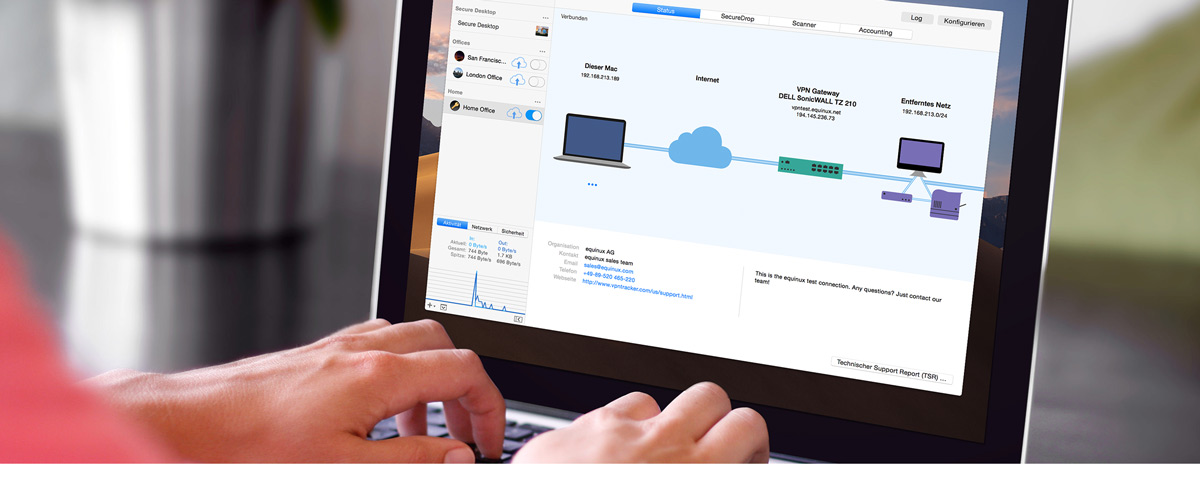

VPN Tracker: Mac VPN client software – Designed for Productive Teams
Choose the VPN client for Mac that is designed for business environments and scales with your Team: Enterprise-ready Team-Management, secure roll-out and Remote Connection Wipe make deployment and management a breeze – for enterprises, small businesses and start-ups.
Why VPN Tracker is great for your business
- Work with multiple VPN connections - The VPN Tracker VPN client allows you to start and stop connections easily
- Easily set-up and deploy remote-workflows that any team-member can use
- Team-Management with automatic enrollment with zero license code confusion
- Increase Remote productivity: distribute ready-to-go connections and include VPN-Shortcuts to your remote infrastructure
- Security through oversight: Control access to VPN connections, segment users into groups and revoke access securely with Remote-Connection-Wipe
Features:
The market leading VPN client for Macs
VPN Tracker is designed for professional use by businesses and IT consultants. It supports industry standard VPN protocols and is compatible with all major VPN brands and gateways. In addition to IPsec and PPTP, it supports vendor-specific VPN protcols for automatic configuration and authentication, making it easy to get set up. VPN Tracker Company Connect includes device profiles for 300+ VPN gateways by leading manufacturers.
For Remote Work
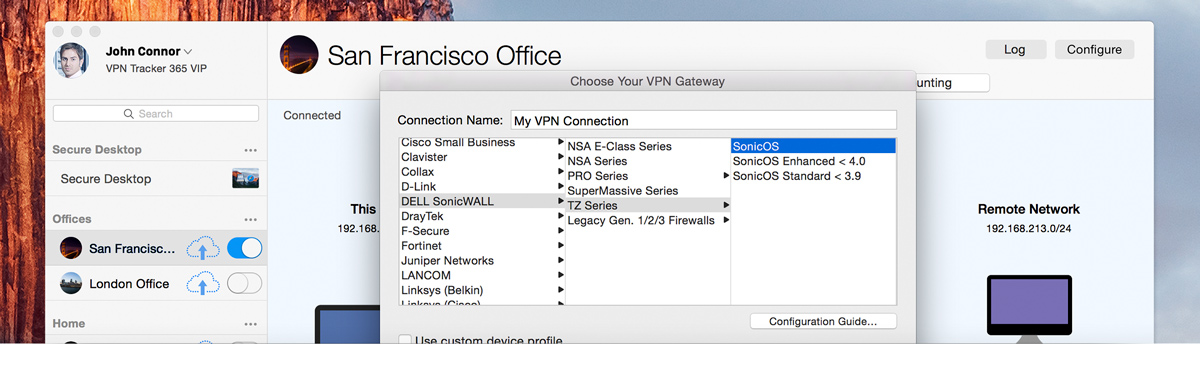
Easily configure and setup VPN on your Mac
VPN Tracker is universal. It is not tied to a single VPN device, manufacturer, or proprietary solution. To make it even easier to connect, VPN Tracker supports various standards and vendor-specific protocols for automatic configuration and authentication.
VPN Tracker is built on the industry standard IPsec protocol. Thus it's compatible with almost every IPsec-based VPN gateway. And if you also need to use OS X L2TP or PPTP connections, you'll be able to control them all from one place with VPN Tracker Pro.
Whether you are connecting your Mac with a VPN to a NETGEAR, Juniper Networks or LANCOM VPN gateway, VPN Tracker can use Mode Config to automatically obtain IP addresses and DNS settings to take the hassle out of administrating multiple VPN users.
VPN Tracker for Mac works great with WatchGuard's easy-to-configure Mobile User VPN. IP addresses and DNS settings are automatically transmitted to VPN Tracker making the rollout of VPN connections a breeze.
If you're working with Cisco devices, configuration of your Mac is a snap with VPN Tracker's support for Cisco EasyVPN connections. No need to worry about configuring IP addresses, remote networks, or various other settings - VPN Tracker connects your Mac to your Cisco VPN gateway behind the scenes so you don't have to worry.
Simple Client Provisioning will automatically detect your SonicWALL VPN gateway and give VPN Tracker what it needs to connect - all you need is to enter your SonicWALL's public IP address, or host name, and VPN Tracker does the rest on your Mac.
VPN Tracker supports Hybrid Mode Authentication - not just for CheckPoint. This is a definite advantage for many Mac users, in particular with Checkpoint or any other VPN gateway that supports Hybrid Mode Authentication.

Support for OpenVPN and SonicWALL SSL
VPN Tracker 365 offers exclusive support for OpenVPN and SonicWALL SSL connections. VPN Tracker 365 regular plan allows you to create only one single OpenVPN and one single SonicWALL SSL connection, whereas PRO and VIP customers can securely use multiple connections.
VPN Tracker 365 supports OpenVPN connections on numerous VPN gateways. Discover more from our Compatibility Guides. You can also easily import your existing OpenVPN connections to use in VPN Tracker 365 thanks to the convenience of .ovpn configuration files.
With VPN Tracker 365, you can seamlessly connect to any SonicWALL SSL VPN – all you need is a server address and domain to get started. VPN Tracker 365 offers full compatibility with MobileConnect and NetExtender style SonicWALL SSL VPN connections.
OpenVPN and SonicWALL SSL connections can be used simultaneously alongside IPSec, L2TP, or PPTP connections in VPN Tracker 365 Pro and VIP.
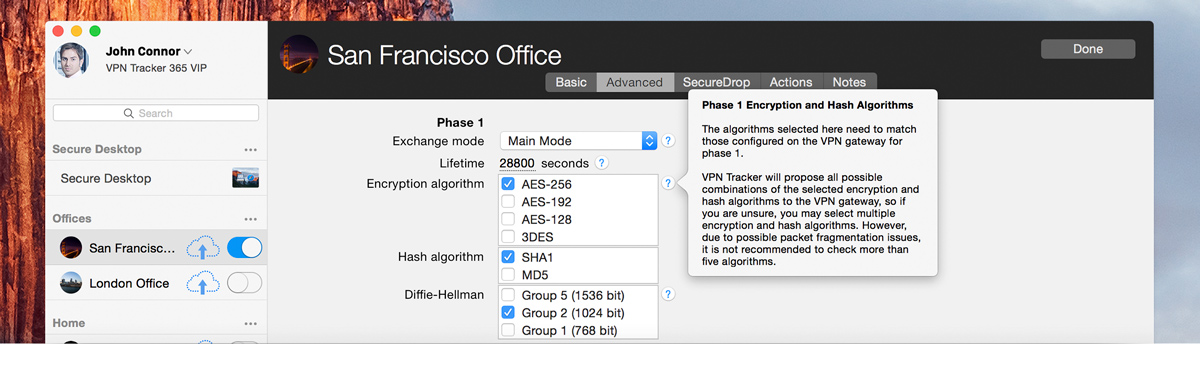
VPN Tracker employs the highest security standards
VPN Tracker is built with the security of your network connections on your Mac in mind. We have integrated the latest security standards to make VPN Tracker secure and ready for the future – no matter what edition of VPN Tracker you're using.
Security is the top priority for VPN Tracker and it uses everything OS X has to offer in terms of security: Your passwords are stored securely in keychain, and VPN Tracker takes advantage of the latest innovations in OS X security – code signing, 64 bit, XPC services, and more – to safeguard your data.
VPN Tracker supports encryption up to AES-256 to satisfy even the most demanding requirements by military organizations, enterprises and government. And because encryption is only as strong as the weakest link, VPN Tracker's hash algorithms include SHA-2, and keys are negotiated with Diffie-Hellman (DH) Groups up to group 18 (8192 bit).
If you need more security than passwords can provide, VPN Tracker also offers support for two-factor authentication (2FA) based on X.509 certificates, smart cards, and PKI token. One-time passcode tokens, such as RSA SecurID, work great with VPN Tracker through Extended Authentication (XAUTH).
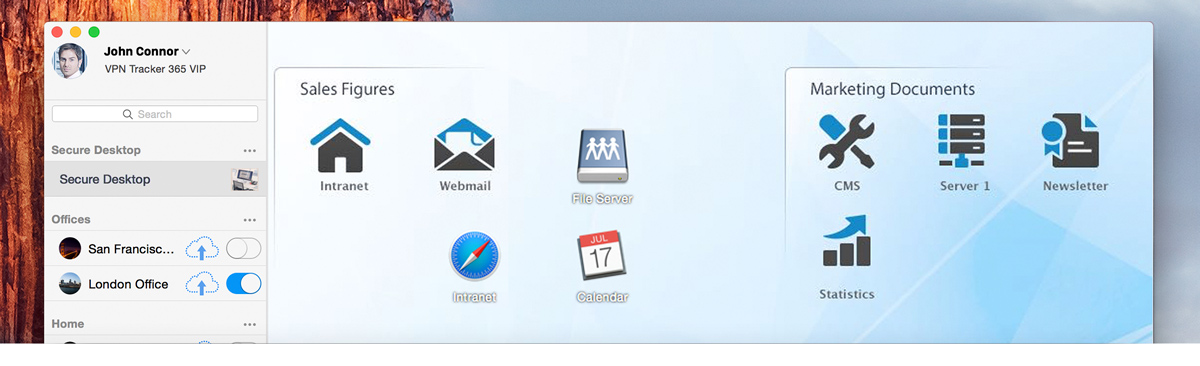
VPN Shortcuts — Get more done over VPN
VPN Tracker gives you one-click access to the files, documents and applications you need to do your work over your VPN connections. Build your own VPN Shortcuts and improve productivity for yourself and the VPN Tracker users you support.
VPN Tracker's VPN Shortcuts make it easy to organize your daily remote tasks: Just add shortcuts for the applications, file servers and other data you need for everyday tasks and workflows.
VPN Shortcuts let you focus on your tasks and get work done. Forget about connecting your VPN before you open a database or access a server – just click your VPN Shortcut and VPN Tracker takes care of the rest.
VPN Shortcuts not only streamline your workflow, but can also become part of your corporate identity: simply customize your VPN Shortcut collection background with your company logo or corporate design.
In addition to standard items such as applications, servers and websites, VPN Shortcuts can be fully customized with AppleScripts and Automator workflows. Use VPN Shortcuts to make even the most complex tasks simple for your users.
Every client and project is different - create multiple VPN Shortcut collections and manage each individually. Have everything neatly organized and ready to go when you have to dive in and fix a problem on your customer's network.
VPN Tracker is a universal security solution for every Mac, making it possible to integrate virtual machines and remote desktop applications to your VPN Shortcuts, including Parallels, VMWare, Apple Remote Desktop, Microsoft Remote Desktop Connection, VNC and CoRD.
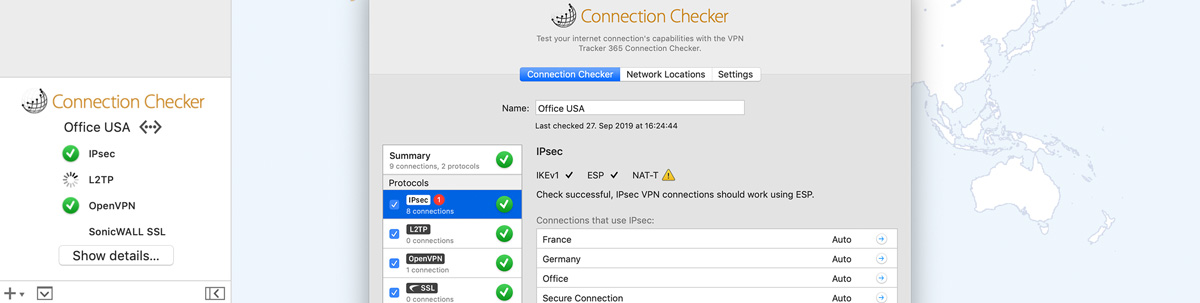
VPN Tracker Connection Checker
"Will my VPN work here?" We’ve all been there: you get to the hotel, connect to the WiFi… and your VPN isn’t working. Is it your VPN? The WiFi? Karma? Now, thanks to VPN Tracker 365 Connection Checker, you’ll know right away. Connection Checker is a new service that automatically tests new network environments and figures out, which VPN standards are supported, so you don’t waste time. Connection Checker quickly connects to VPN Tracker 365 servers and figures out, which settings to use for successful VPN connections. Connect, check, go.
- Test whether your internet will work with IPsec, L2TP, OpenVPN or SonicWALL SSL VPN.
- Indicator badges for all your connections
- Quick mini overview in the connection list
- An overview of all network environments you’ve tested
- Check all supported protocols – not just the ones your connections use
- Advanced settings
- IPsec
- L2TP
- OpenVPN
- SonicWALL SSL
Securely connect to your VPN from anywhere
Whether you are at an airport or using the hotel's WiFi, VPN Tracker has built-in intelligence to get your Mac connected.
VPN Tracker 365 automatically detects the settings required for your internet connection and sets the right the NAT-Traversal settings – one less thing to take care of.
VPN Tracker's advanced rekeying ability means your connections will stay connected longer and more reliably than other VPN clients. And with support for Dead-peer-detection (DPD) and automatic DHCP lease-renewal over VPN, nothing will interrupt your work.
VPN Tracker can automatically quit applications, disconnect servers and close databases before the VPN is disconnected from your Mac, preventing annoying error messages and data loss.

VPN Tracker Connection Safe
VPN Tracker Connection Safe keeps your VPN connections safe, backed-up and in sync across all your Macs. Using state-of-the-art cryptography, Connection Safe uses encryption, so only you can access your connections.
Connection Safe adds an additional level of security to your connections: all your connection details are encrypted using a highly-secure key (Argon3 + PKTNY) that only you can unlock.
Lost or broken Mac? Connection Safe keeps your connections safe, so you can instantly get them on your new Mac. Sign in with your secure key and they are instantly downloaded and ready to go.
iMac at home and MacBook for the road? Connection Safe keeps your connections synced across all your Macs – securely and effortlessly.
For Pros
Network Scanner for remote VPN networks PRO
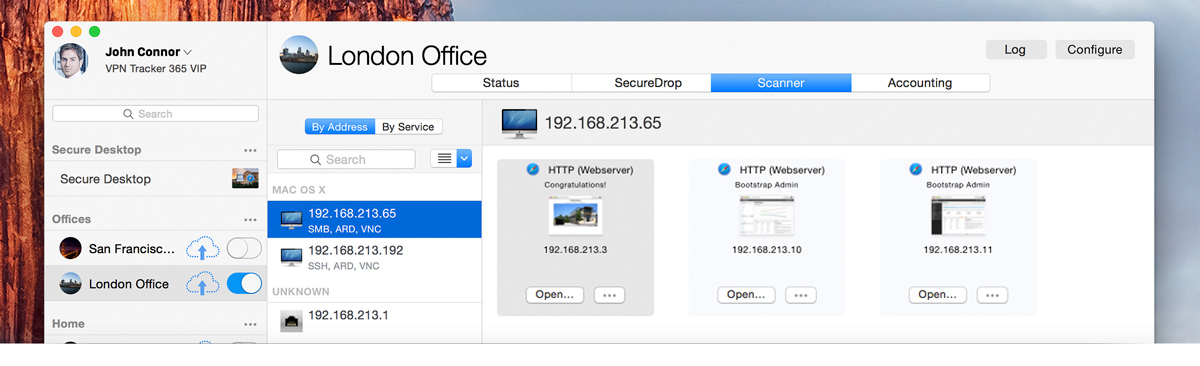
The Network Scanner in VPN Tracker Pro gives Mac users a complete overview of all devices in their network. While scanning, VPN Tracker recognizes the type of device, detects the operating system it is running, and displays available services for direct access.
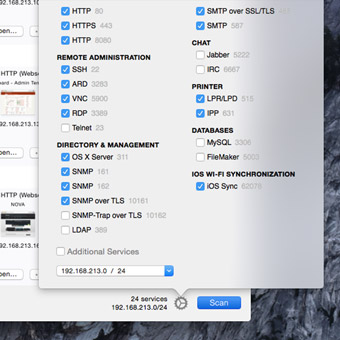
VPN Tracker's Network Scanner can automatically scan for the most frequently used network services and can be customized to scan other services or ports. Find file shares, remote administration, screen sharing, databases, web and mail servers, etc.
Find and connect with remote VPN devicesWith just one click of a button, the VPN Tracker Network Scanner connects you to your device or network service within your VPN. Need a host's IP address elsewhere? No problem, simply copy and paste it.
The Network Scanner automatically recognizes different kinds of devices and operating systems within your VPN and groups devices and services accordingly.
Quick overview of your VPN with your MacDisplay scan results by IP address, host name and operating system, or sort according to services. Filtering and website previews give you an instant overview of the remote network you're securely connected to by VPN.
Accounting made easy with VPN Tracker PRO
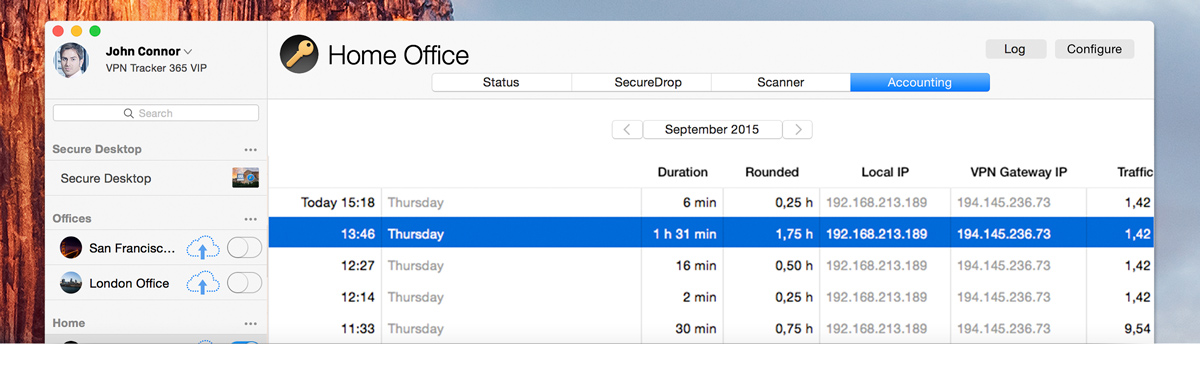
VPN Tracker Pro pays off quickly for Apple consultants and business users. The integrated Accounting function takes care of time-tracking, eliminating the end of the month burden of adding up consulting time.
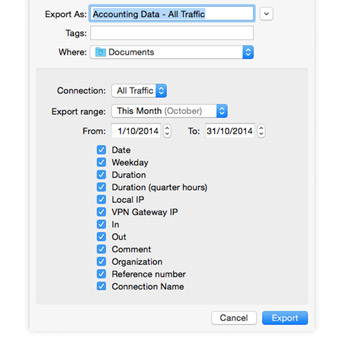
Track and export a log of all your VPN connections, including connection times, IP addresses, traffic, and duration. Add comments for later reference and export to your billing or time-tracking tool.
Export to Numbers, Excel, or to billing systems using a customizable CSV export. Enter a reference number or organization to easily match accounting records with your billing system.
Use multiple VPN connections on your Mac
Connect to multiple VPNs simultaneously and organize large numbers of connections with search and groups – perfect for power users and consultants.
Group your VPN connections by project or client, so you have everything in one place. Got a lot of connections? Use search to quickly jump to a particular VPN connection or client.
Check your connection status and start or stop any VPN connection right from the menu bar.
VPN Tracker can automatically connect or disconnect your VPN in certain network locations, on specific wifi networks, or based on other rules, so your connection is always ready to go, when and where you need it.
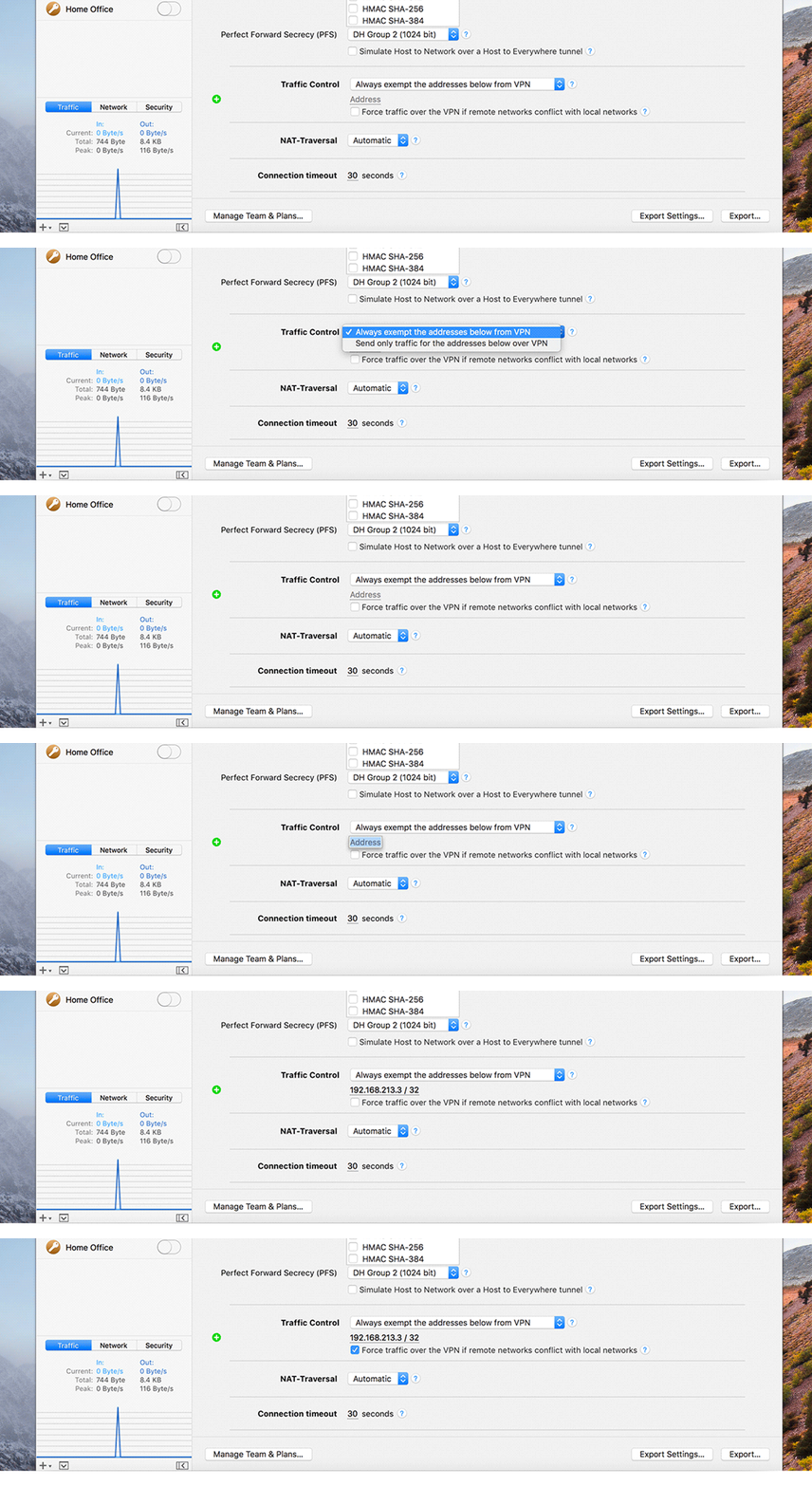
Traffic Control - Take control of your VPN traffic
Don’t want to send traffic to certain IP address or subnets over VPN? Simply exclude them! Have a Host to Everywhere VPN but only need some addresses over VPN? Tell VPN Tracker to only send traffic to those IPs over VPN.
VPN for your Windows applications
Do you rely on your Windows applications? Why not share your secure connection with your Windows virtual machine: Access your SAP application, check email and appointments using Outlook, and open your Access database.
Are you using VMware or Parallels on your Mac to run Windows? VPN Tracker shares your VPN with the Windows applications inside your virtual machine.
Connect to remote Windows PCs with Microsoft Remote Desktop Connection with a single click, thanks to VPN Shortcuts.
Add VPN Shortcuts for your most frequently used apps from any Windows virtual machine – right alongside your favorite Mac apps.
For Teams
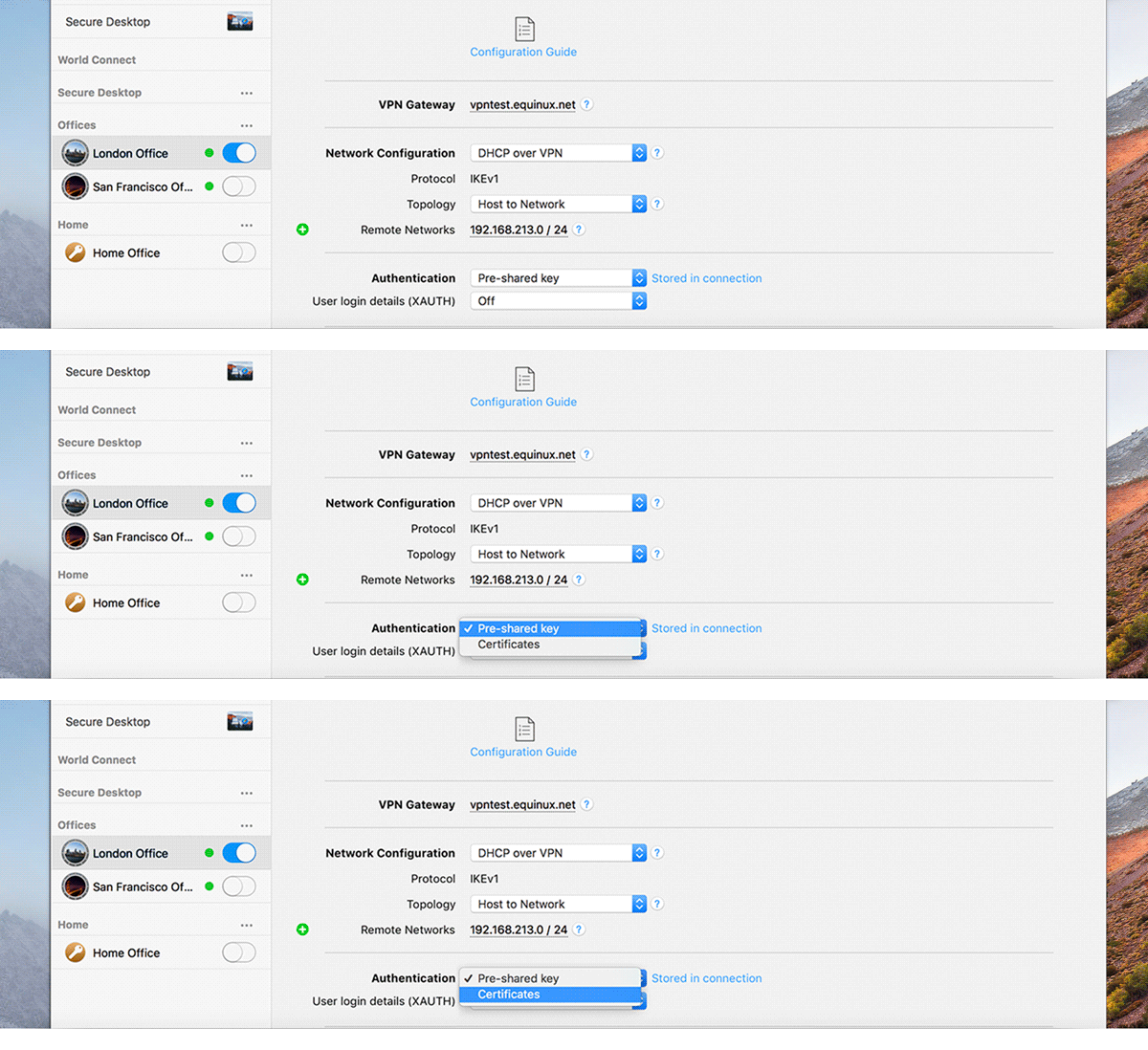
Export and deploy PRO
VPN Tracker is easy to deploy within businesses or to customers. Export connections and VPN Shortcuts from VPN Tracker Pro, and manage users and plans using VPN Tracker's Team Management.
It's quick and easy to distribute VPN Tracker workstations. Rollout VPN Tracker with a standard macOS installer package, making it easy to integrate with 3rd party deployment solutions.
VPN Tracker remembers your VPN connection's export settings including your pre-configured VPN Shortcuts. This speeds up large-scale deployments and makes configuration changes simple to roll out.
As an administrator or consultant, you have total control over the security settings for your VPN users. Whether passwords can be saved or settings seen or altered, is entirely up to you.

Team Management made easy
With VPN Tracker, you can comfortably roll-out VPN acces to your team: Invite new team members by email and pre-assign plans.
Long lists of licence keys to manage your team are a thing of the past. Just invite your team members via email and provide them with the VPN connection. That's it.
VPN Tracker team management makes it easy to manage team members, assign plans and will even ping admins as soon as a new member joins. Plan and manage your roll-out via an easy to use web interface.
When a MacBook gets lost: Delete VPN connections remotely
VPN Tracker 365 Remote Connection Wipe allows a Team Manager to remotely remove all team connections from a team member’s computer, when it gets lost or stolen. The 'Remote Connection Wipe' feature is included in all VPN Tracker 365 plans.
If a MacBook ever gets lost or stolen, there’s a risk that remote access to your network could fall into the wrong hands. With VPN Tracker 365 Remote Connection Wipe, you can prevent unauthorized VPN access by remotely deleting the connection.
Remote Connection Wipe offers additional security by removing information about your VPN infrastructure. It also has the added benefit of allowing you to block VPN access for an individual user without having to distribute a new connection to your entire team.
VPN Tracker 365 Remote Wipe is designed and built to work without having any information about your connections. This gives you the convenience of remote access control, without exposing your connection information to cloud servers.
Buyer's Guide:
Target Group
- VPN Tracker 365 - VPN enduser
- VPN Tracker 365 PRO - Professional users, consultants
- VPN Tracker 365 VIP - Advanced VPN customers, professional users, consultants
- VPN Tracker 365 BIZ - Teams, Businesses, Enterprises, Consulting Firms & Admins
| VPN Tracker 365 | VPN Tracker 365 PRO | VPN Tracker 365 VIP | VPN Tracker 365 BIZ | |
|---|---|---|---|---|
| Overview | ||||
| Securely connect to VPNs | ||||
| Easy Configuration and Setup Support | ||||
| VPN Availability Check | ||||
| L2TP & PPTP VPN Gateways" | ||||
| OpenVPN & SonicWALL SSL Support | ||||
| Create VPN connections | ||||
| IPsec, L2TP & PPTP VPN connections | ||||
| Create one OpenVPN & SonicWALL SSL connection | ||||
| Create and use multiple OpenVPN & SonicWALL SSL connections | ||||
| VPN Setup Support | ||||
| Email Support | ||||
| Advanced Support | ||||
| Setup Concierge | ||||
| Deployment Concierge | ||||
| Key Account Manager | ||||
| Connection Checker | ||||
| Test your connections' protocols | ||||
| Test all protocolls | ||||
| Overview for all tested Network Locations | ||||
| Team & Cloud | ||||
| NEW Connection Safe | ||||
| Team Management | ||||
| Remotely delete VPN connections | ||||
| Role-based connection access | ||||
| Team Management | ||||
| Invite team members | ||||
| Manage VPN working stations | ||||
| Export & deploy VPN connections | ||||
| Consultant Features | ||||
| Export and deploy connections | ||||
| Integrated Network Scanner for remote VPN networks | ||||
| Integrated accounting feature for billing | ||||
| Updates & Upgrades | ||||
| All Security Updates | ||||
| New features for customers | ||||
| New features for professionals | ||||
| All new features | ||||
| Compatibility | ||||
| macOS 10.15 (Catalina) | ||||
| macOS 10.14 (Mojave) | ||||
| macOS 10.13 (High Sierra) | ||||
| macOS 10.12 (Sierra) | ||||
| macOS 10.11 (El Capitan) | ||||
| macOS 10.10 (Yosemite) | ||||
| macOS 10.9 (Mavericks) | ||||
| Support for all future macOS versions | ||||
Tech Specs:
System Requirements
VPN Tracker 365 is ready for macOS Catalina, macOS Mojave 10.14 and supports macOS High Sierra 10.13, macOS Sierra 10.12, OS X El Capitan 10.11, OS X Yosemite (10.10) and OS X 10.9 Mavericks. SonicWALL SSL VPN support requires macOS 10.11 or later. Subscribers can also use all older VPN Tracker versions for legacy OS X 10.4 - 10.8 support.
VPN Technologies
VPN Standards
- IPsec VPN
- OpenVPN (with VPN Tracker 365)
- L2TP VPN (with VPN Tracker 365)
- PPTP VPN (with VPN Tracker 365)
- SonicWALL SSL VPN (with VPN Tracker 365)
Automatic Configuration
- Mode Config (NETGEAR, Juniper Networks ...)
- Cisco EasyVPN
- Cisco Meraki
- WatchGuard Mobile User VPN
- SonicWALL Simple Client Provisioning
- SonicWALL DHCP over VPN
- SonicWALL SSL VPN
Networking
- Host-to-Network (Split-Tunneling)
- Host-to-Everywhere (Tunnel All Traffic)
- Host-to-Host
- Network-to-Network (requires VPN Tracker 365 Pro or VIP)
- Remote DNS
- Reverse Remote DNS
- IPv6
Security
Encryption Algorithms
- AES-256, AES-192, AES-128 encryption
- 3DES, DES, DES-IV64, DES-IV32
Hash Algorithms
- SHA-2 (SHA-256, SHA-384, SHA-512)
- SHA-1
- MD5
Diffie-Hellman (DH) Key Exchange
- Groups 14 to 18 (up to 8192 bit)
- Group 5 (1536 bit)
- Group 2 (1024 bit)
- Group 1 (768 bit)
Authentication
- Pre-shared keys
- RSA X.509 certificates
- Extended Authentication (XAUTH)
- Hybrid Mode (CheckPoint and others)
2-factor Authentication (2FA)
- Smart cards and PKI tokens
- Support for authenticator tokens (RSA SecurID, CryptoCard, etc.) through XAUTH
- Compatible with vendor specific 2FA tokens such as FortiToken for FortiGate devices
Getting and Staying Connected
Get Connected, Anywhere
- NAT detection and NAT-Traversal (RFC 3947 including drafts)
- Cisco UDP Encapsulation
- Automatic VPN availability test: Determines whether to use IPsec passthrough or NAT-Traversal with your current Internet connection
Stay Connected
- Rekeying
- Dead Peer Detection (DPD)
- Automatic DHCP Renewal
Ready to Help
- Specific troubleshooting advice instead of cryptic log messages
- Built-in help for every setting
- Diagnostic tools built right in
- One-click Technical Support Reports
Productivity
VPN Shortcuts - Your VPN Cockpit
- Connect to file servers, remote desktop, and much more
- Support for
- Mac (AFP), Windows (SMB/CIFS), FTP, WebDAV, NFS file servers
- Screen Sharing
- Apple Remote Desktop
- Microsoft Remote Desktop
- CoRD
- OS X Server
- FileMaker
- AppleScript
- Automator
- ...and any other application, file or URL your Mac can open!
Network Scanner (VPN Tracker 365 Pro / VIP)
- Explore the remote network of your VPN, assist users and locate hosts and services
- OS Detection
- Connect directly to hosts and services
Accounting (VPN Tracker 365 Pro or VIP)
- Document your work and bill your clients
- Export to Numbers and Excel
- Customizable CSV export for billing and time tracking systems
Automation
- Actions at VPN connect and disconnect
- Automatic clean disconnect of file servers
- Notifications for important events
Streamlined User Interface
- Condensed Layout (VPN Tracker 365 Pro or VIP)
- Menu Bar Item
- Hidden Dock icon
- Connection groups (VPN Tracker 365 Pro or VIP)
- Search (VPN Tracker 365 Pro or VIP)
Export and Deployment
- Export connections and VPN Shortcuts
- Lock connections to prevent users from modifying settings, storing passwords, etc.
- Set up a standard VPN work environment for end users
- Hassle-free license management that can be integrated into your asset and user management workflow
- Ships as OS X installer package for use with industry-standard deployment solutions
Business:
VPN Tracker 365 for Business
Give all the members on your team the full power of VPN Tracker 365 VIP. Advanced rollout and management tools give you the visibility and control you need to power your team's VPN productivity.
VPN Tracker 365 for enterprises
Create a common VPN work environment for your users: Prepare pre-configured VPN Shortcuts for them. Your employees will have access to all the important connections to the server and databases, without grappling with elaborate IPs and time-consuming setups. The configured VPN Shortcuts can then easily be exported and shared.
VPN Tracker is designed for seamless rollout with your preferred Device Management Solution.
Remote Connection WipeVPN Tracker 365 Remote Connection Wipe allows a Team Manager to remotely remove all team connections from a team member’s computer. The 'Remote Connection Wipe' feature is included on all VPN Tracker 365 plans.
Import a list of your employees who need VPN access and auto-enroll them in your VPN Tracker team.
Control over VPN configurationPrevent saving passwords to meet internal security policy requirements. Disable employee access to sensitive configuration settings to prevent accidental changes or disclosure of the connection configuration.
VPN Tracker Team Management
If there are several VPN users in your organisation, it can be difficult to keep track of who has access to your secure VPN. That’s why every VPN Tracker user gets their own account and plan. Our secure Team Management tool makes it simple to manage employees’ VPN Tracker access.
Create a group, invite users and assign the plans – all in a few clicks. There’s no need to send any licence keys, a new team member will get a familiar email invite. You can also change plans or remove the user if a colleague doesn’t need VPN Tracker anymore.
With Team Management, you don’t need to share a password and take security risks to access VPN Tracker. Each user has their own equinux account and plan, and you are confident in the VPN access control.
If a colleague ever leaves the team, you can easily revoke their plans and remotely remove your company’s connection from their computer. Just set up the “Remote Connection Wipe” option before sharing the connection. You can also use it if one of the users loses a MacBook. This prevents any unauthorized VPN access without changing the connection for the all other team members.
FAQ:
VPN Tracker 365: Frequently Asked Questions (FAQ)
What is VPN Tracker?
VPN Tracker is the #1 VPN software client for Macs. It’ll allow you to connect securely to your home or office network over the internet.
What VPN standards does VPN Tracker support?
VPN Tracker is designed for IPsec VPN and supports a wide range of encryption algorithms, vendor-specific protocols and authentication mechanism.
What’s the difference between VPN Tracker 365 and VPN Tracker 9?
Both VPN Tracker 365 and VPN Tracker 9 support the same connection standards, encryption options and configuration guides, so both will get you connected to your VPN gateway.
VPN Tracker 365 is available via a subscription plan and offers additional features, the ability to use multiple Macs and includes all minor and major upgrades.
VPN Tracker 9 is available as a one-time purchase. If you prefer a traditional software license model, VPN Tracker 9 is the way to go.
I don't want a recurring charge
No problem. You can purchase VPN Tracker as a one-time license (VPN Tracker 9) or as an ongoing service plan (VPN Tracker 365).
Can I use VPN Tracker on more than one Mac?
VPN Tracker 365 plan can be used on all of your personal Macs. VPN Tracker 9 is licensed per Mac, so you need to purchase a license for each computer you want to use VPN Tracker 9 on.
Do you offer monthly VPN Tracker 365 plans?
All VPN Tracker 365 plans are available with a yearly commitment.
Can I continue using VPN Tracker 365 after the expiration of my term?
You can use VPN Tracker 365 during the entire duration of your term. In order to secure your data connections without interruption, the term will renew automatically. You will of course receive an email notification from us prior to the expiration date. If you do not wish to automatically renew your term, you can deactivate thie option at any time.
Does VPN Tracker store any data in the cloud?
No, VPN Tracker does not save any connection data in the cloud. Your account details or license are stored in your equinux ID, but no other data ever touches our servers.
Already a VPN Tracker user?
I own VPN Tracker 5/6/7/8, how can I upgrade?
As an existing VPN Tracker customer, you can benefit from discounted upgrade plans. Make use of the VPN Tracker 365 advantages and you can use every VPN Tracker version, including the VPN Tracker 365 client that runs with OS X El Capitan.
I use VPN Tracker 6 or 7 and would like to use VPN Tracker for OS X Yosemite or El Capitan. What are my options?
VPN Tracker 365 includes all VPN Tracker clients starting from Version 6 and all future Updates and Upgrades. This includes the VPN Tracker 365 client which supports El Capitan. So you can use VPN Tracker 8 for Yosemite, as well as the VPN Tracker 365 client for OS X El Capitan with your VPN Tracker 365 plan.
I recently bought VPN Tracker 8, will I get VPN Tracker 365?
All customers that purchased VPN Tracker 8 after June 1st, 2015, will receive 12 months of VPN Tracker 365 for free, starting October 1st. You just have to install and activate VPN Tracker 365 with your equinux ID.
I bought VPN Tracker 8 before June 1st 2015, do I get a discount?
As a VPN Tracker 8 customer, we offer you a discounted pricing for upgrade plans.
We're using a VPN Tracker business pack (5+1/10+2/25+3), how can we upgrade?
VPN Tracker 365 is also available for businesses. Besides the VIP functionality for all employees in your team, you also receive an additional tool for the rollout and the management of your VPNs.
Can I continue using my existing VPN Tracker 6 / 7 / 8 license?
Yes, you can. In order to use VPN Tracker on OS X El Capitan, you will need the VPN Tracker 365 plan, which by the way includes all VPN Tracker version starting with version 6.
Which version of VPN Tracker will profit from the extended VIP features?
The new VPN Tracker 365 client includes extended VIP features, which can only be used with the VPN Tracker 365 VIP plan. These features are available in the VPN Tracker 365 client.
I have a VPN Tracker Protection Plan, is it also valid for VPN Tracker 365?
Yes, it is. You'll benefit from all VPN Tracker 365 advantages with the same period as your VPN Tracker Protection Plan.
World Connect:
World Connect - Protect your privacy with a VPN service you can trust
Nowadays, if you're on the internet, you need a VPN to protect your privacy, keep your data safe on a public wifi hotspot, or to access the open internet. VPN Tracker World Connect is an easy to use VPN service you can trust.
So, how do you choose a VPN service provider?
There are lots out there and they all make big promises:
"Fastest servers", "Unlimited data", "No logs", "Best deal"…
So if they’re all the best, how do you choose?
We think a VPN should offer:
- Fast, reliable access from anywhere in the world
- A trustworthy company with a zero logging policy and privacy guaranteed by European data protection laws
- No zany offers, no ads, no nonsense – just a clear and simple monthly or yearly price
What makes us different
Real people
We're not based in the Caribbean or owned by a shell company – you can come visit our offices in Munich
Real servers
We don’t use shared virtual servers hosted by the cheapest providers. World Connect is powered by a CDN-level infrastructure that transfers hundreds of terabytes of data every day. It's not cheap, but it’s ultra high-performance and extremely reliable.
Real apps
We don’t use a white-labeled app written by a third-party – you get a native Mac or iOS app developed by our engineers, with all the security and networking experience we can offer.
Real prices
Our prices are competitive and honest: There are no hidden costs or gotchas if you cross some arbitrary limit. The price you see on our website is what you’ll pay – no extras, no hidden fees, just clear and simple pricing.
Real encryption
There's no compromising when it comes to your security. VPN Tracker World Connect uses the very latest encryption standard AES-256 with DH-Group 18 (8192 bits) combined with hardware-accelerated algorithms for the fastest performance.
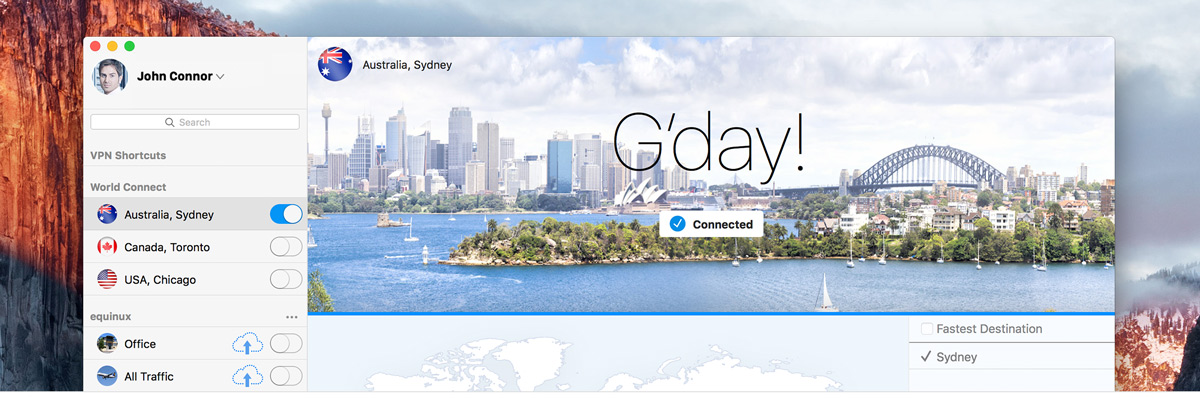
Magic VPN: find the best connection
Whether you need to access the open internet or just protect yourself on public wifi, World Connect will automatically find the fastest server and best connection for your needs.
Secure and trustworthy
Is your VPN provider trustworthy? VPN Tracker is a professional solution with years of experience. It's the best choice for businesses and users with the highest security requirements.
Simultaneous VPN usage
Use VPN Tracker Company Connect and VPN Tracker World Connect simultaneously. Intelligent routing allows you to run both VPNs side by side.
World Connect - Destinations all over the world
 |
Australia |  |
Austria |  |
Belgium |
 |
Brazil |  |
Canada |  |
Denmark |
 |
France |  |
Germany |  |
Hungary |
 |
Japan |  |
Luxembourg |  |
Netherlands |
 |
New Zealand |  |
Poland |  |
Singapore |
 |
South Korea |  |
Spain |  |
Sweden |
 |
Switzerland |  |
UK |  |
USA |
Choose from hundreds of VPN servers in multiple countries. Or use Magic VPN to automatically connect to the best VPN Destination.
Get VPN Tracker World Connect to start your smart VPN protection
VPN Tracker World Connect is also available for iPhone & iPad. One plan for your Mac, iPhone & iPad
Pricing Notes:
- Pricing and product availability subject to change without notice.